

Still sat firmly on the fence about using Manychat? Curious about what it can do, but wary of being seen as ‘spammy’ or inauthentic? This is for you…
There’s no doubt that DM automation has taken off in a big way over the past year. You’ve likely seen more and more accounts asking you to ‘Comment XX to receive YY’ on their posts, reels and stories.
But is it right for your account?
Before you make a decision, let’s take a deeper dive into the ‘need to know’ about using DM automation. What benefits can you expect to see – and what are the pitfalls (if any!)
Set up correctly, there’s no doubt that using Manychat to automate your leads can save you time AND boost your conversion rate, all whilst still being human AND fun!
And in my opinion, there are definitely many more pros than there are cons to implementing Manychat on to your Instagram account, so let’s start there:
1. Increased engagement and reach
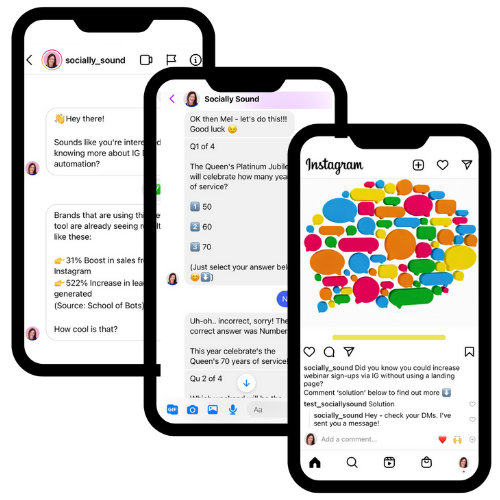
Implement Manychat on your account and you’ll be able to use your posts, reels, lives, stories, story mentions, emoji reactions, direct DMs and the Reveal sticker as triggers for your automations – phew!
When you get comments on your Instagram content (engagement), and the chat flows are triggered, that interaction sends positive signals to the algorithm (more reach). Instagram wants on-platform engagement – and Manychat amplifies this. Boom!
2. Saves times in the DMs
How much time are you spending in the DMs? Maybe you’re thanking customers for tagging your product in their unboxing video. Or maybe you’re knee-deep answering questions that get asked time and time again.
Or maybe, quelle horreur, you get so many DMs that you just ignore most of them…eek!
Set up simple automations, such as the Story Mention reply, or a FAQ flow and Manychat will do the heavy lifting for you – overwhelm be gone!
3: Personalised conversations
Best way to build rapport in the DMs? Use the flow to ask the user their name. Even if you’re only using Manychat to send people from a post/reel to a website link (beginner level 101) use the first couple of message nodes to ask their name.
This can then be saved in the system field and the chat flow (and future automations) can continue on a much more personalised level. No more ‘Hi there’, or ‘hey, you’!
4. Higher conversion rate than link in bio
Just think how much work a user needs to do to actually get to your link in bio, find the right link AND take action on it. It’s a LOT. And we don’t like to work hard.
Not only that but sending them to link in bio takes them away from your post. When they then find the right link, you’re sending them away from the platform entirely. It’s not exactly algorithm friendly.
Commenting one word, on a story, post, reel or via a DM, for example, is sooo much easier AND it keeps the conversation on-platform – much better for the algorithm.
Opt them in, within the DMs, and you’re likely to see a much higher conversion rate, as well as a more seamless customer journey. Average conversion rates for chat flows are about 60% (my clients’ flows are nearer 80%) – considerably higher than the average landing page.
5. Opportunities for re-engagement
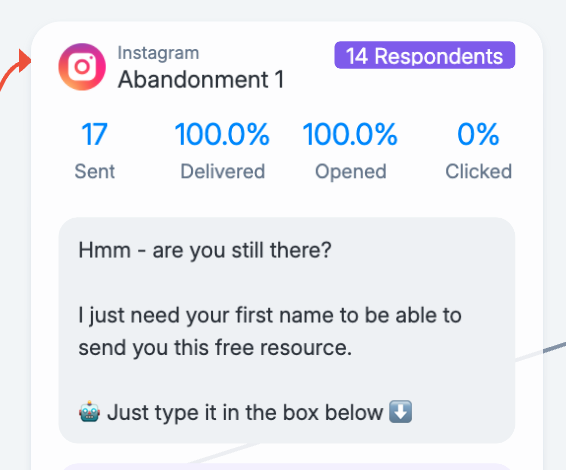
When you send people to a website landing page, and they don’t take your intended action (normally to sign up for something) for whatever reason, invariably you can’t get them to return to that landing page unless you serve them a Facebook ad, or they remember to return themselves.
With Manychat, you have 24hrs to send them more messages. So if they get interrupted during the chat flow, or they click away, you can send them further messages at pre-timed intervals to encourage and remind them to sign up.
You can see in this image of one of my client’s flows, that 17 reminders have been sent – and on receiving the message, 14 have then returned to the flow to continue their opt-in. That’s 14 sign-ups my client could have lost completely, had that user been sent to a landing page.
6. Pivot the conversation
But what if they really don’t want to sign up for your masterclass, or they’ve changed their mind about booking a call with you? Don’t just end the conversation there – pivot them to something else. A different lead magnet maybe, or a masterclass with a different theme? Or a sweet little discount code for a new product range?
With Manychat the ability to pivot that conversation is super powerful – invariably you’ll still get their email address to build your list, and they’ll still get ‘something’ from you, even if it’s not the original ‘thing’ they thought they wanted.
Want to learn more about DM automation via Manychat?
Click here to download one of my FREE guides!
7. Impossible to ‘spam’ people
Bots, chatbots – sadly this word has been unfairly stigmatised as being ‘bad’ – synonymous with annoying, spammy behaviour that plagues our social channels. For this very reason, I tend to refer to my builds as chat flows or chat funnels instead. And Manychat isn’t spammy, because it can’t be. It’s permission-based marketing.
You see, when you implement Manychat on your account, you’re bound by Meta compliance – as is anything that runs on Meta’s platforms or through its API.
Your chat flows will only be triggered when a user comments your keyword, or has an interaction with your account. By taking these actions they are giving you ‘permission’ to make contact with them.
8. Doesn’t stop human interaction
No siree! Adding Manychat to your IG account doesn’t mean you can’t follow up with users yourself. In fact, bringing potential leads into your business via automation and then following up via human DM is a great strategy!
Once users have been through your automation (which should be simple, short and to the point) any further contact can be made organically, should you choose to do so.
So what are the ‘downsides’ – if there are any?
In my opinion there aren’t any downsides – and I do admit I am a little bit biased! But there are a couple of things you should be aware of.
The 24-hour rule
What is it this exactly? This is Meta compliance – you know those rules that we are bound by when connecting into the Meta API? Yep – that.
In short, it means that once a user has opted into your chat flow, you have 24 hours in which to send them as many automated messages as you like.
Should you bombard them with every automation you’ve got going? Nope. Bad move. A huge turn-off that will make your users run for the hills – and not exactly strategic marketing either.
But an automated follow-up message to see if they have any questions after downloading your lead magnet, or a re-engagement message to bring them back into the flow to take your intended action? Yep, these are all totally strategic and viable within that 24-hour window.
So what happens once 24 hours has passed and that window of opportunity has ended? Well, you can’t send them any automated messages unless they opt in again, ie, they interact with your account via a keyword or action.
Want to learn more about DM automation via Manychat?
Click here to download one of my FREE guides!
So why do some people find this rule a little restrictive ?
I frequently get asked ‘what’s the point of paying for my Manychat contacts if I can’t contact them beyond 24 hours?’
And it’s a valid question. Here’s my answer:
The primary objective of using DM automation is to build your email list or get sales. Your email list is where you should continue to nurture them.
The 24-hour rule exists to protect the user – and it’s up to the brand to build flows that are strategic and timely. If it didn’t exist there would be some more ‘unscrupulous’ accounts that would send out blanket automations to all their users – and this would be spammy. This is what Meta doesn’t want – it’s a poor user experience.
Once they’ve been through your automations, you can set up rules, or practise timely list cleaning to make sure you’re not paying for more contacts than you need.
Mobile-only platform
Another thing to bear in mind is that Instagram is a mobile-first platform – always has been. And this means that Manychat only works properly when the triggers are activated from a user’s mobile device. A high majority of your potential users will be scrolling IG from their mobile anyway, but if you think that this may be an issue, you can always use your post to set their expectations, ie: ‘comment XXX from your mobile and I’ll DM you…’
And finally…
There’s no doubt that to use Manychat strategically, you need to know how to build chat flows that deliver strategic sales messages, gather names and emails and ping that information over to your CRM. It’s a learning curve and not one to be rushed. Winging it is not advised!
How can you do this without faff and overwhelm?
Here are some options:
1. Instagram DM StarterKit: this is for you if you just want to dip your toe in, get a general idea of what it’s all about and test out a simple comment to website link flow (not hugely strategic, but easy to do and great as a first step). This is FREE to access!
2. Instagram DM LaunchKit: ready to dive in and build out your first opt-in flow? Great! This kit is a hand-holding, mini-training that will guide you through building out a strategic flow where users give you their name and email within the DMs. There’s even a template to help you on your way. A no-brainer to getting started with clear, concise instructions!
Any further questions? Drop me an email at mel@sociallysound.co.uk – I promise I am human – and do respond to my emails!